How do I create a starfield animation in Java Swing?

You can simulate flying through stars by assigning each star a depth and projecting its position onto a two-dimensional panel. As the depth decreases, the star moves farther from the center of the screen and appears larger.
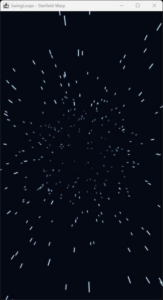
Starfield Warp
Starfield Warp

This SwingLoops example draws 420 stars with short light trails. It uses Java Swing and Java 2D without a 3D engine, external libraries, or image assets.

Source code

Save the following code as StarfieldWarp.java:

import java.awt.*;
import java.awt.geom.*;
import java.util.Random;
import javax.swing.*;

public class StarfieldWarp extends JPanel {
    private static final int WIDTH = 450;
    private static final int HEIGHT = 800;
    private static final int COUNT = 420;
    private static final double CYCLE = 12.0;
    private static final double FOCAL = 260.0;

    private final double[] x = new double[COUNT];
    private final double[] y = new double[COUNT];
    private final double[] offset = new double[COUNT];
    private final Timer timer = new Timer(16, _ -> repaint());
    private long startedAt;

    public StarfieldWarp() {
        setPreferredSize(new Dimension(WIDTH, HEIGHT));
        setBackground(new Color(5, 9, 20));

        Random random = new Random(42);
        for (int i = 0; i < COUNT; i++) {
            double angle = random.nextDouble() * 2 * Math.PI;
            double radius = 0.12 + 1.8 * Math.sqrt(random.nextDouble());
            x[i] = radius * Math.cos(angle);
            y[i] = radius * Math.sin(angle);
            offset[i] = random.nextDouble();
        }
    }

    @Override
    public void addNotify() {
        super.addNotify();
        startedAt = System.nanoTime();
        timer.start();
    }

    @Override
    public void removeNotify() {
        timer.stop();
        super.removeNotify();
    }

    @Override
    protected void paintComponent(Graphics graphics) {
        super.paintComponent(graphics);
        Graphics2D g = (Graphics2D) graphics.create();

        try {
            g.setRenderingHint(RenderingHints.KEY_ANTIALIASING,
                    RenderingHints.VALUE_ANTIALIAS_ON);

            double scale = Math.min(
                    getWidth() / (double) WIDTH,
                    getHeight() / (double) HEIGHT);
            g.translate(getWidth() / 2.0, getHeight() / 2.0);
            g.scale(scale, scale);
            g.clipRect(-WIDTH / 2, -HEIGHT / 2, WIDTH, HEIGHT);

            double seconds = (System.nanoTime() - startedAt) / 1e9;
            double phase = (seconds % CYCLE) / CYCLE;

            for (int i = 0; i < COUNT; i++) {
                double progress = (phase + offset[i]) % 1.0;
                double z = 4.0 - 3.8 * progress;

                double screenX = FOCAL * x[i] / z;
                double screenY = FOCAL * y[i] / z;

                double previousZ = Math.min(4.0, z + 0.045);
                double tailX = FOCAL * x[i] / previousZ;
                double tailY = FOCAL * y[i] / previousZ;

                // Hide each star as it enters or leaves its depth cycle.
                double fadeIn = Math.min(1, progress / 0.08);
                double fadeOut = Math.min(1, (1 - progress) / 0.06);
                float alpha = (float) (fadeIn * fadeOut);
                float width = (float) (0.6 + 1.8 * progress);

                g.setColor(new Color(110, 192, 255));
                g.setComposite(
                        AlphaComposite.SrcOver.derive(alpha * 0.13f));
                g.setStroke(new BasicStroke(width + 4f,
                        BasicStroke.CAP_ROUND,
                        BasicStroke.JOIN_ROUND));
                g.draw(new Line2D.Double(
                        tailX, tailY, screenX, screenY));

                g.setColor(new Color(225, 244, 255));
                g.setComposite(AlphaComposite.SrcOver.derive(alpha));
                g.setStroke(new BasicStroke(width,
                        BasicStroke.CAP_ROUND,
                        BasicStroke.JOIN_ROUND));
                g.draw(new Line2D.Double(
                        tailX, tailY, screenX, screenY));
            }
        } finally {
            g.dispose();
        }
    }

    static void main() {
        SwingUtilities.invokeLater(() -> {
            JFrame frame = new JFrame("SwingLoops - Starfield Warp");
            frame.setDefaultCloseOperation(JFrame.EXIT_ON_CLOSE);
            frame.setContentPane(new StarfieldWarp());
            frame.pack();
            frame.setLocationRelativeTo(null);
            frame.setVisible(true);
        });
    }
}

Run the example

You need a Java Development Kit and a desktop environment that supports Swing windows.

Open a terminal in the directory containing the file and run:

javac StarfieldWarp.java
java StarfieldWarp

The preferred drawing area is 450 × 800 pixels. Resize the window to fit your display; the drawing preserves its proportions. Close the window to exit.

Give each star a position and a depth

Each star receives fixed horizontal and vertical coordinates, plus a random offset within the animation cycle. The random offsets spread the stars across different depths instead of making them approach together.

The star’s depth decreases over time:

double progress = (phase + offset[i]) % 1.0;
double z = 4.0 - 3.8 * progress;

A star starts at depth 4.0 and approaches depth 0.2 before returning to the far end. The depth stays positive, avoiding division by zero.

The fixed random seed produces the same star arrangement on each run. The animation repeats every 12 seconds because every star completes one depth cycle in that interval.

Project the stars onto the screen

The key equations are:

double screenX = FOCAL * x[i] / z;
double screenY = FOCAL * y[i] / z;

The FOCAL constant converts the star coordinates into logical screen pixels. Dividing by depth creates perspective.

For example, a star with x = 1 is drawn at horizontal coordinate 65 when z = 4, but at coordinate 260 when z = 1. Its horizontal position in space has not changed; its projected position moves outward because it is closer.

This is the same basic relationship that makes nearby objects appear larger than distant ones.

Draw a trail behind each star

The trail begins at a slightly greater depth:

double previousZ = Math.min(4.0, z + 0.045);

Projecting that deeper point places the trail’s tail closer to the screen center. A line from the tail to the current position suggests forward motion.

Despite its name, previousZ is not a stored previous-frame position. It is a fixed depth offset, so the trail does not depend on the repaint rate. Perspective naturally makes the trail longer as the star approaches.

The code draws each line twice: a wide translucent stroke creates a soft halo, and a narrow bright stroke forms the center.

Hide the depth reset

Modulo arithmetic returns a star to the far end when its progress reaches one. Without a fade, that reset could produce a visible jump.

The first 8% of each star’s journey fades in, and the final 6% fades out. At the wrap point, the star is invisible. Many stars also leave the panel’s visible bounds before reaching their nearest depth.

This makes the repeating depth cycle less noticeable while keeping the simulation deterministic.

Animate with Swing

A Swing timer requests repaints approximately every 16 milliseconds. The program calculates motion from elapsed time measured with System.nanoTime(), rather than moving stars a fixed amount per frame.

A delayed repaint therefore skips ahead to the correct position instead of slowing down the animation.

The interface is created on Swing’s event-dispatch thread. The timer starts when the panel becomes displayable and stops when it is removed.

Customize the animation

Setting Effect
COUNT Number of stars.
CYCLE Duration of each depth journey; smaller values increase speed.
FOCAL Projection scale; larger values move stars farther from the center.
0.045 in the tail calculation Trail length in depth units.
Stroke colors Star and halo colors.
0.08 and 0.06 Fade-in and fade-out portions of each journey.

For a first experiment, reduce CYCLE from 12 to 8 seconds. Then increase the tail depth offset to 0.08 to create longer streaks.

The complete source code above is free to copy and run. Explore the SwingLoops repository for more Java animation examples.
How do I create an animated moiré pattern in Java Swing?

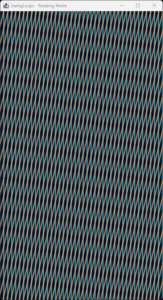
You can create a moiré pattern by drawing two sets of parallel lines on top of one another and rotating one set slightly. Their spacing produces broad bands that appear to move as the angle changes.

Rotating Moire
Rotating Moire

This SwingLoops example uses Java Swing and Java 2D to animate the effect. It requires no external libraries or image assets.

Source code

Save the following code as RotatingMoire.java:

import java.awt.*;
import java.awt.geom.Line2D;
import javax.swing.*;

public class RotatingMoire extends JPanel {
    private static final int WIDTH = 450;
    private static final int HEIGHT = 800;
    private static final int EXTENT = 700;
    private static final int SPACING = 11;
    private static final double CYCLE = 12.0;

    private final Timer timer = new Timer(16, _ -> repaint());
    private long startedAt;
    private int mode = 3;

    public RotatingMoire() {
        setPreferredSize(new Dimension(WIDTH, HEIGHT));
        setBackground(new Color(9, 16, 29));

        for (int i = 1; i <= 3; i++) {
            final int selected = i;
            String action = "mode" + i;
            getInputMap(WHEN_IN_FOCUSED_WINDOW).put(
                    KeyStroke.getKeyStroke((char) ('0' + i)), action);
            getActionMap().put(action, new AbstractAction() {
                @Override
                public void actionPerformed(
                        java.awt.event.ActionEvent event) {
                    mode = selected;
                    repaint();
                }
            });
        }
    }

    @Override
    public void addNotify() {
        super.addNotify();
        startedAt = System.nanoTime();
        timer.start();
    }

    @Override
    public void removeNotify() {
        timer.stop();
        super.removeNotify();
    }

    private static void layer(Graphics2D parent,
                              double angle, Color color) {
        Graphics2D g = (Graphics2D) parent.create();
        try {
            g.rotate(angle);
            g.setColor(color);
            g.setStroke(new BasicStroke(3.5f));
            for (int x = -EXTENT; x <= EXTENT; x += SPACING) {
                g.draw(new Line2D.Double(
                        x, -EXTENT, x, EXTENT));
            }
        } finally {
            g.dispose();
        }
    }

    @Override
    protected void paintComponent(Graphics graphics) {
        super.paintComponent(graphics);
        Graphics2D g = (Graphics2D) graphics.create();

        try {
            g.setRenderingHint(RenderingHints.KEY_ANTIALIASING,
                    RenderingHints.VALUE_ANTIALIAS_ON);

            double scale = Math.min(
                    getWidth() / (double) WIDTH,
                    getHeight() / (double) HEIGHT);
            g.translate(getWidth() / 2.0, getHeight() / 2.0);
            g.scale(scale, scale);
            g.clipRect(-WIDTH / 2, -HEIGHT / 2, WIDTH, HEIGHT);

            double seconds = (System.nanoTime() - startedAt) / 1e9;
            double phase = 2 * Math.PI * (seconds % CYCLE) / CYCLE;
            double movingAngle = Math.toRadians(
                    10 + 7 * Math.sin(phase));

            layer(g, 0, new Color(62, 202, 226, 180));

            if (mode >= 2) {
                layer(g, mode == 2 ? Math.toRadians(10) : movingAngle,
                        new Color(244, 166, 123, 180));
            }
        } finally {
            g.dispose();
        }
    }

    static void main() {
        SwingUtilities.invokeLater(() -> {
            JFrame frame = new JFrame("SwingLoops - Rotating Moire");
            frame.setDefaultCloseOperation(JFrame.EXIT_ON_CLOSE);
            frame.setContentPane(new RotatingMoire());
            frame.pack();
            frame.setLocationRelativeTo(null);
            frame.setVisible(true);
        });
    }
}

Run the example

With a JDK 25 installed, open a terminal in the directory containing the source file:

javac RotatingMoire.java
java RotatingMoire

A desktop environment is required to display the Swing window. Close the window to stop the application.

Use these keys while the window is active:

Key View
1 Show only the fixed cyan lines.
2 Add a stationary second layer at 10 degrees.
3 Animate the second layer.

Draw the two layers

The layer() method draws equally spaced vertical lines. Each line has the same width and extends beyond the visible canvas.

Before drawing the second layer, the code rotates its copied graphics context:

g.rotate(angle);

Java 2D transforms all subsequent line coordinates. The method disposes the copied context afterward, so its rotation does not affect the other layer.

The broad bands are not separate shapes. They emerge where the two repeating line patterns overlap.

Why do broad bands appear?

When two line grids have similar orientations, their relative alignment changes slowly across the image. Some regions contain closely aligned lines; elsewhere, the lines separate and cross. This creates a larger repeating pattern over the fine line structure.

For two ideal grids with the same spacing s and an angle difference θ, the moiré spacing is approximately:

D = s / (2 × sin(θ / 2))

Angles in this formula are in radians. As the angle difference becomes smaller, the broad bands become farther apart.

For example, with a line spacing of 11 pixels and an angle difference of 10 degrees, the idealized band spacing is about 63 pixels. Stroke width, transparency, and the screen’s sampling affect the final appearance.

This example deliberately constructs the effect from two layers. It is different from unwanted aliasing caused solely by insufficient display resolution, although resizing can introduce additional sampling effects.

Animate the rotation

The rotating layer follows this angle:

double movingAngle = Math.toRadians(
        10 + 7 * Math.sin(phase));

Sine varies from −1 to 1, so the angle varies smoothly between 3 and 17 degrees. Keeping it away from zero avoids the extremely wide band spacing near perfect alignment.

The time phase completes one turn every 12 seconds:

double phase = 2 * Math.PI * (seconds % CYCLE) / CYCLE;

At the cycle boundary, the angle returns to its starting value with matching motion, allowing the animation to repeat smoothly.

Paint safely with Swing

A Swing timer requests repaints approximately every 16 milliseconds. Actual repaint frequency depends on the event queue and system performance.

The angle uses elapsed time rather than a frame counter, so delayed frames do not change the intended cycle duration. The interface, timer callbacks, and painting run on Swing’s event-dispatch thread.

The drawing is centered, scaled uniformly, and clipped to a logical 450 × 800 canvas. This preserves its proportions when the window is resized.

Customize the effect

Try changing one setting at a time:

Setting Effect
SPACING Distance between lines; changes the scale of the moiré pattern.
3.5f stroke width Changes how much each layer covers the background.
10 in the angle calculation Average angle between layers.
7 in the angle calculation Amount of angular variation.
CYCLE Duration of one back-and-forth rotation.
Layer colors and alpha values Change the contrast and overlap colors.

Start by increasing SPACING from 11 to 15. The fine lines and the broad pattern will both become more widely spaced.

The complete source code above is free to copy and run. Explore the SwingLoops repository for more Java animation examples.
How do I animate a fractal tree in Java Swing?

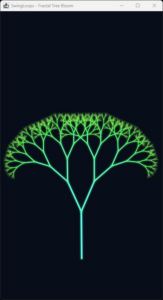
You can draw a fractal tree by creating a branch and recursively drawing two shorter branches at its endpoint. Repeating this rule produces an intricate tree from a small amount of code.

In this SwingLoops example, the branches grow over time, sway gently, and fade away before the next cycle. Everything is drawn with Java Swing and Java 2D.

Fractal Tree Bloom
Fractal Tree Bloom

Source code

Save the following code as FractalTreeBloom.java:

import javax.swing.*;
import java.awt.*;
import java.awt.geom.Line2D;

public class FractalTreeBloom extends JPanel {
    private static final int WIDTH = 450;
    private static final int HEIGHT = 800;
    private static final int LEVELS = 9;
    private static final double CYCLE = 12.0;

    private final Timer timer = new Timer(16, _ -> repaint());
    private long startedAt;

    public FractalTreeBloom() {
        setPreferredSize(new Dimension(WIDTH, HEIGHT));
        setBackground(new Color(7, 13, 25));
    }

    @Override
    public void addNotify() {
        super.addNotify();
        startedAt = System.nanoTime();
        timer.start();
    }

    @Override
    public void removeNotify() {
        timer.stop();
        super.removeNotify();
    }

    private static double clamp(double value) {
        return Math.max(0, Math.min(1, value));
    }

    private static double smooth(double value) {
        return value * value * (3 - 2 * value);
    }

    private void branch(Graphics2D g, double x, double y,
                        double angle, double length, int level,
                        double growth, double spread, float fade) {
        if (level >= LEVELS) {
            return;
        }

        double local = smooth(clamp(growth - level));
        if (local <= 0) {
            return;
        }

        double endX = x + length * local * Math.cos(angle);
        double endY = y + length * local * Math.sin(angle);

        Color color = Color.getHSBColor(
                0.48f - level * 0.025f, 0.65f, 1f);
        float width = Math.max(1f, 5f - level * 0.5f);
        Line2D line = new Line2D.Double(x, y, endX, endY);

        g.setColor(color);
        g.setComposite(AlphaComposite.SrcOver.derive(fade * 0.10f));
        g.setStroke(new BasicStroke(width + 7f,
                BasicStroke.CAP_ROUND, BasicStroke.JOIN_ROUND));
        g.draw(line);

        g.setComposite(AlphaComposite.SrcOver.derive(fade));
        g.setStroke(new BasicStroke(width,
                BasicStroke.CAP_ROUND, BasicStroke.JOIN_ROUND));
        g.draw(line);

        if (local >= 1) {
            branch(g, endX, endY, angle - spread, length * 0.70,
                    level + 1, growth, spread, fade);
            branch(g, endX, endY, angle + spread, length * 0.70,
                    level + 1, growth, spread, fade);
        }
    }

    @Override
    protected void paintComponent(Graphics graphics) {
        super.paintComponent(graphics);
        Graphics2D g = (Graphics2D) graphics.create();

        try {
            g.setRenderingHint(RenderingHints.KEY_ANTIALIASING,
                    RenderingHints.VALUE_ANTIALIAS_ON);

            double scale = Math.min(
                    getWidth() / (double) WIDTH,
                    getHeight() / (double) HEIGHT);
            g.translate((getWidth() - WIDTH * scale) / 2,
                    (getHeight() - HEIGHT * scale) / 2);
            g.scale(scale, scale);

            double seconds = (System.nanoTime() - startedAt) / 1e9;
            double t = seconds % CYCLE;
            double growth = Math.min(LEVELS, t * LEVELS / 7.5);
            double wind = Math.sin(2 * Math.PI * t / 6.0);
            double spread = Math.toRadians(25 + 3 * wind);
            float fade = (float) (1 - clamp((t - 10) / 2));

            branch(g, WIDTH / 2.0, 685,
                    -Math.PI / 2 + 0.025 * wind,
                    130, 0, growth, spread, fade);
        } finally {
            g.dispose();
        }
    }

    static void main() {
        SwingUtilities.invokeLater(() -> {
            JFrame frame = new JFrame("SwingLoops - Fractal Tree Bloom");
            frame.setDefaultCloseOperation(JFrame.EXIT_ON_CLOSE);
            frame.setContentPane(new FractalTreeBloom());
            frame.pack();
            frame.setLocationRelativeTo(null);
            frame.setVisible(true);
        });
    }
}

Run the example

You need a JDK and a desktop environment that supports Swing. From the directory containing the file, run:

javac FractalTreeBloom.java
java FractalTreeBloom

The application opens a portrait window with a preferred drawing area of 450 × 800 pixels. Resizing preserves the drawing’s proportions. Close the window to exit.

Draw one branch

Each branch starts at (x, y) and extends in the direction given by angle. Sine and cosine convert its length and angle into an endpoint:

double endX = x + length * local * Math.cos(angle);
double endY = y + length * local * Math.sin(angle);

The local value controls how much of the branch is visible. Zero means no visible length; one means the branch has reached its full length.

The trunk starts at an angle of -Math.PI / 2. Swing’s vertical coordinates increase downward, so this angle points upward.

Repeat the rule with recursion

When a branch finishes growing, it creates two children at its endpoint:

branch(g, endX, endY, angle - spread, length * 0.70,
        level + 1, growth, spread, fade);
branch(g, endX, endY, angle + spread, length * 0.70,
        level + 1, growth, spread, fade);

The children turn in opposite directions and have 70% of their parent’s length. Each child follows the same rule.

The method stops when level reaches LEVELS. With nine levels, numbered zero through eight, a completed tree contains:

1 + 2 + 4 + ... + 256 = 511 branches

The stopping condition matters: without it, the recursive calls would continue until the program exhausted its stack.

Reveal the levels over time

The growth value increases from zero to nine over 7.5 seconds. Each branch subtracts its level to obtain its own progress:

double local = smooth(clamp(growth - level));

For example, when growth is 2.5, the trunk and level-one branches are complete. Level-two branches are halfway through their growth, and deeper levels are still hidden.

The smoothstep function eases the motion:

return value * value * (3 - 2 * value);

Its slope is zero at both ends, so a branch begins and finishes growing gently.

Add wind, color, and glow

A sine function changes the branching angle slightly over time. The same wind value also tilts the trunk. This creates a stylized sway; the code does not simulate forces or flexible wood.

The hue changes with branch level, giving the trunk and tips different colors. Each branch is drawn twice: a wide transparent stroke creates a halo, and a thinner bright stroke forms the visible branch.

Growth finishes at 7.5 seconds. The completed tree continues swaying, then fades from ten to twelve seconds. At the cycle boundary, growth returns to zero and the tree starts again.

Update the animation with Swing

A Swing timer requests repaints approximately every 16 milliseconds. Positions depend on elapsed time rather than frame counts, so delayed repaints do not change the intended cycle duration.

The interface is created on Swing’s event-dispatch thread. The timer starts when the panel becomes displayable and stops when it is removed. A copied Graphics2D context is disposed after each repaint.

Customize the tree

Try changing the branch-length multiplier from 0.70 to 0.65 in both recursive calls. The tree becomes more compact because each generation shrinks faster.

You can also adjust:

Setting Effect
LEVELS Tree detail. Each extra level approximately doubles the branch count.
130 Initial trunk length.
25 + 3 * wind Base branching angle and its variation, in degrees.
7.5 Time taken to reveal all levels.
width + 7f Width of the glow stroke.

Larger lengths, wider branching angles, or more levels may require changes to the scale or trunk position to keep the tree inside the canvas.

The complete source above is free to copy and run. Explore the SwingLoops repository for more Java animation examples.
How do I animate a falling domino spiral in Java Swing?

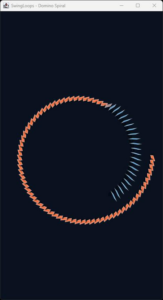
A domino chain reaction can be animated by giving each tile a slightly later start time. In this SwingLoops example, 92 dominoes are placed on a spiral. Each one appears to fall toward the next, changing from blue to orange as it moves. You can create the effect using Java Swing and Java 2D without a physics engine or external libraries.

Domino Spiral
Domino Spiral

Source code

Save this example as DominoSpiral.java.

import javax.swing.*;
import java.awt.*;
import java.awt.geom.Path2D;

public class DominoSpiral extends JPanel {
    private static final int WIDTH = 450;
    private static final int HEIGHT = 800;
    private static final int COUNT = 92;
    private static final double START = 1.0;
    private static final double DELAY = 0.065;
    private static final double FALL = 0.24;
    private static final double CYCLE = 10.0;
    private static final Color BACKGROUND = new Color(10, 17, 31);

    private final double[] x = new double[COUNT];
    private final double[] y = new double[COUNT];
    private final double[] direction = new double[COUNT];
    private final Timer timer = new Timer(16, _ -> repaint());
    private long startedAt;

    public DominoSpiral() {
        setPreferredSize(new Dimension(WIDTH, HEIGHT));
        setBackground(BACKGROUND);

        // Place the tiles about 13 pixels apart along the spiral.
        double angle = 0;
        double pitch = 8.5;
        for (int i = 0; i < COUNT; i++) {
            double radius = 195 - pitch * angle;
            x[i] = WIDTH / 2.0 + radius * Math.cos(angle);
            y[i] = HEIGHT / 2.0 + radius * Math.sin(angle);
            angle += 13 / Math.hypot(radius, pitch);
        }

        for (int i = 0; i < COUNT - 1; i++) {
            direction[i] = Math.atan2(y[i + 1] - y[i], x[i + 1] - x[i]);
        }
        direction[COUNT - 1] = direction[COUNT - 2];
    }

    @Override
    public void addNotify() {
        super.addNotify();
        startedAt = System.nanoTime();
        timer.start();
    }

    @Override
    public void removeNotify() {
        timer.stop();
        super.removeNotify();
    }

    private static double clamp(double value) {
        return Math.max(0, Math.min(1, value));
    }

    private static Color tileColor(double progress) {
        return new Color(
                57 + (int) (193 * progress),
                171 - (int) (54 * progress),
                248 - (int) (179 * progress));
    }

    private static void drawTile(Graphics2D g, double progress) {
        double lean = 10 * progress;
        double height = 20 - 14 * progress;

        g.setColor(new Color(2, 6, 13, 150));
        g.fillOval(-5, -6, 19, 12);

        Path2D face = new Path2D.Double();
        face.moveTo(0, -4);
        face.lineTo(0, 4);
        face.lineTo(lean + 5, 4 - height);
        face.lineTo(lean + 5, -4 - height);
        face.closePath();

        g.setColor(tileColor(progress));
        g.fill(face);
        g.setColor(new Color(255, 255, 255, 155));
        g.draw(face);
    }

    @Override
    protected void paintComponent(Graphics graphics) {
        super.paintComponent(graphics);

        double elapsed = (System.nanoTime() - startedAt) / 1e9;
        double t = elapsed % CYCLE;
        double fade = t < 9 ? 1 : 1 - clamp(t - 9);
        Graphics2D g = (Graphics2D) graphics.create();
        try {
            g.setRenderingHint(RenderingHints.KEY_ANTIALIASING,
                    RenderingHints.VALUE_ANTIALIAS_ON);

            double scale = Math.min(getWidth() / (double) WIDTH,
                    getHeight() / (double) HEIGHT);
            g.translate((getWidth() - WIDTH * scale) / 2,
                    (getHeight() - HEIGHT * scale) / 2);
            g.scale(scale, scale);
            g.setComposite(java.awt.AlphaComposite.SrcOver.derive((float) fade));

            g.setColor(new Color(31, 49, 72));
            Path2D track = new Path2D.Double();
            track.moveTo(x[0], y[0]);
            for (int i = 1; i < COUNT; i++) {
                track.lineTo(x[i], y[i]);
            }
            g.draw(track);

            for (int i = 0; i < COUNT; i++) {
                double u = clamp((t - START - i * DELAY) / FALL);
                double progress = u * u * (3 - 2 * u);
                Graphics2D tile = (Graphics2D) g.create();
                try {
                    tile.translate(x[i], y[i]);
                    tile.rotate(direction[i]);
                    drawTile(tile, progress);
                } finally {
                    tile.dispose();
                }
            }
        } finally {
            g.dispose();
        }
    }

    static void main() {
        SwingUtilities.invokeLater(() -> {
            JFrame frame = new JFrame("SwingLoops - Domino Spiral");
            frame.setDefaultCloseOperation(JFrame.EXIT_ON_CLOSE);
            frame.setContentPane(new DominoSpiral());
            frame.pack();
            frame.setLocationRelativeTo(null);
            frame.setVisible(true);
        });
    }
}

Run the example

Open a terminal in the directory containing the file. With a JDK installed and a desktop environment available, run:

javac DominoSpiral.java
java DominoSpiral

The window opens with a preferred drawing area of 450 × 800 pixels. Resize it to fit your screen; the drawing keeps its proportions. Close the window to exit.

Place the tiles along a spiral

The code starts with a radius of 195 pixels and reduces it by 8.5 pixels for each radian of angular travel. Sine and cosine convert the radius and angle to a position on the screen.

Using the same angle increment everywhere would spread out the outer tiles and crowd the inner ones. Instead, the code uses this approximation:

angle += 13 / Math.hypot(radius, pitch);

For a small angle change, the distance traveled along this spiral is approximately the angle change multiplied by sqrt(radius² + pitch²). Dividing the desired spacing of 13 pixels by that factor gives an angle step that grows as the spiral tightens. The result is approximately even spacing. After placing the tiles, Math.atan2() determines which direction each tile should face by looking at the next tile.

Turn a delay into a chain reaction

The first tile starts one second into the cycle. Each later tile waits an additional 65 milliseconds:

double u = clamp((t - START - i * DELAY) / FALL);

A value of zero means the tile is upright, and one means it has finished falling. The fall takes 240 milliseconds, so several neighboring tiles are in motion at once. Smoothstep, u * u * (3 - 2 * u), eases the movement at both ends.

To draw the fall, the program shifts the tile’s upper edge forward and reduces its visible height. Its color shifts toward orange at the same time. This is a stylized 2D animation: the timing creates the apparent chain reaction, and the program does not calculate contact between tiles.

Repeat the animation

A Swing timer requests repaints about every 16 milliseconds. The drawing uses elapsed time from System.nanoTime(), so a delayed repaint does not change when the next tile is supposed to fall. During the final second the spiral fades away. At the ten-second boundary, the upright tiles reappear.

Try raising DELAY from 0.065 to 0.075 to slow down the chain. If you increase it further, check that START + (COUNT - 1) * DELAY + FALL still fits before the fade begins at nine seconds.

The complete source code is free to copy and run. Find more examples in the SwingLoops repository.

How do I animate wave interference in Java Swing?

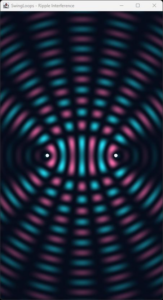
Drop two pebbles into water and the ripples overlap. Where two crests meet, they reinforce each other; where a crest meets an equally strong trough, they cancel. In this SwingLoops example, we use two sinusoidal waves to recreate that pattern pixel by pixel.

The result is a portrait animation with cyan crests, pink troughs, and dark bands where the combined displacement is small. The example uses Java Swing and Java 2D without external libraries.

Ripple Interference
Ripple Interference

Source code

Save the following code as RippleInterference.java:

import java.awt.Color;
import java.awt.Dimension;
import java.awt.Graphics;
import java.awt.Graphics2D;
import java.awt.RenderingHints;
import java.awt.image.BufferedImage;
import java.awt.image.DataBufferInt;
import javax.swing.JFrame;
import javax.swing.JPanel;
import javax.swing.SwingUtilities;
import javax.swing.Timer;

public class RippleInterference extends JPanel {
    private static final int W = 180, H = 320;
    private static final int AX = 52, BX = 128, SY = 160;
    private static final double TAU = 2 * Math.PI;
    private static final double CYCLE = 8.0;
    private static final Color BACKGROUND = new Color(6, 12, 26);

    private final BufferedImage image =
            new BufferedImage(W, H, BufferedImage.TYPE_INT_RGB);
    private final int[] pixels =
            ((DataBufferInt) image.getRaster().getDataBuffer()).getData();
    private final float[] sine = new float[W * H];
    private final float[] cosine = new float[W * H];
    private final Timer timer = new Timer(33, _ -> repaint());
    private long start;

    public RippleInterference() {
        setPreferredSize(new Dimension(450, 800));
        setBackground(BACKGROUND);
        for (int y = 0; y < H; y++) {
            for (int x = 0; x < W; x++) {
                int i = y * W + x;
                double a = Math.hypot(x - AX, y - SY);
                double b = Math.hypot(x - BX, y - SY);
                double ka = TAU * a / 21, kb = TAU * b / 21;
                double wa = 1 / (1 + a / 110);
                double wb = 1 / (1 + b / 110);
                sine[i] = (float) (wa * Math.sin(ka) + wb * Math.sin(kb));
                cosine[i] = (float) (wa * Math.cos(ka) + wb * Math.cos(kb));
            }
        }
    }

    @Override
    public void addNotify() {
        super.addNotify();
        start = System.nanoTime();
        timer.start();
    }

    @Override
    public void removeNotify() {
        timer.stop();
        super.removeNotify();
    }

    private void render(double seconds) {
        double phase = TAU * 5 * ((seconds % CYCLE) / CYCLE);
        double c = Math.cos(phase), s = Math.sin(phase);
        for (int i = 0; i < pixels.length; i++) {
            // sin(k*d - phase), summed across both sources.
            double wave = sine[i] * c - cosine[i] * s;
            double glow = Math.min(1, Math.abs(wave) / 1.5);
            glow *= glow;
            int r = 6 + (int) (glow * (wave >= 0 ? 32 : 238));
            int g = 12 + (int) (glow * (wave >= 0 ? 222 : 98));
            int b = 26 + (int) (glow * (wave >= 0 ? 229 : 143));
            pixels[i] = (r << 16) | (g << 8) | b;
        }
    }

    @Override
    protected void paintComponent(Graphics graphics) {
        super.paintComponent(graphics);
        drawFrame(graphics, getWidth(), getHeight(),
                  (System.nanoTime() - start) / 1e9);
    }

    void drawFrame(Graphics graphics, int width, int height, double seconds) {
        render(seconds);

        Graphics2D g = (Graphics2D) graphics.create();
        try {
            double scale = Math.min(width / (double) W,
                                    height / (double) H);
            g.translate((width - W * scale) / 2,
                        (height - H * scale) / 2);
            g.scale(scale, scale);
            g.setRenderingHint(RenderingHints.KEY_INTERPOLATION,
                               RenderingHints.VALUE_INTERPOLATION_BILINEAR);
            g.drawImage(image, 0, 0, null);
            g.setColor(new Color(237, 249, 255));
            g.fillOval(AX - 2, SY - 2, 4, 4);
            g.fillOval(BX - 2, SY - 2, 4, 4);
        } finally {
            g.dispose();
        }
    }

    static void main() {
        SwingUtilities.invokeLater(() -> {
            JFrame frame = new JFrame("SwingLoops - Ripple Interference");
            frame.setDefaultCloseOperation(JFrame.EXIT_ON_CLOSE);
            frame.setContentPane(new RippleInterference());
            frame.pack();
            frame.setLocationRelativeTo(null);
            frame.setVisible(true);
        });
    }
}

Run the example

From the directory containing the source file, run:

javac RippleInterference.java
java RippleInterference

The default window is 450 × 800 pixels. Resize it to see the pattern scale while keeping its aspect ratio. Close the window to exit.

Calculate a ripple at each pixel

A circular wave depends on how far the pixel is from its source. The program finds that distance with Math.hypot():

double a = Math.hypot(x - AX, y - SY);
double ka = TAU * a / 21;
double wa = 1 / (1 + a / 110);

Here, TAU is one full turn in radians, or 2π. Dividing by 21 means the spatial phase advances by one turn every 21 image pixels. The factor wa makes the amplitude smaller as distance increases.

A source contributes wa × sin(ka − phase). As the shared time phase increases, points of equal phase move outward from the source. The program adds this contribution to the corresponding contribution from the second source.

The waves have the same frequency and start in phase. If the difference between the two distances is a whole wavelength, their oscillations reinforce each other. At half a wavelength, one oscillation opposes the other. Their amplitudes may differ because of the distance weights, so those opposing waves can leave a small residual instead of canceling completely.

Cache the parts that depend on position

Calculating each distance and calling sine twice for every pixel on every repaint would repeat work. The sources stay fixed, so the code uses the identity:

sin(k − p) = sin(k) cos(p) − cos(k) sin(p)

For each pixel, the constructor caches the sum of the two weighted spatial sines and the sum of the two weighted spatial cosines. During painting, it only needs the sine and cosine of the time phase:

double c = Math.cos(phase), s = Math.sin(phase);
double wave = sine[i] * c - cosine[i] * s;

The same values of c and s apply to all 57,600 pixels. With five turns of phase per eight-second interval, each oscillation takes 1.6 seconds.

Convert displacement to color

The sign selects cyan or pink. The magnitude controls how bright that color becomes:

double glow = Math.min(1, Math.abs(wave) / 1.5);
glow *= glow;

Squaring the normalized magnitude makes weaker values darker and emphasizes stronger peaks and troughs. A dark pixel shows low displacement at that instant; the dark lanes that persist as the ripples move reveal where the waves repeatedly oppose each other.

The renderer writes each color into an integer-backed BufferedImage and then scales the finished image with bilinear interpolation. Working at 180 × 320 keeps the per-frame calculations small while the window can display the image at a larger size.

Animate the result with Swing

A Swing timer requests a repaint approximately every 33 milliseconds. The animation reads time with System.nanoTime() instead of counting repaint events, so a late frame does not slow the intended wave motion. The window and timer run on Swing’s event-dispatch thread.

The renderer is also available through drawFrame(), which accepts a time in seconds. That makes it possible to render the same pattern into an image at a chosen instant without opening the Swing window.

Try changing the pattern

Move the sources closer together and compare the spacing of the dark bands. Then change the wavelength from 21 to 28 in both phase calculations. Keeping everything else fixed lets you see how the spacing changes with wavelength.

The complete Java source is free to copy and run. Explore more examples in the SwingLoops repository.