You can create interactive fireworks in Java Swing by combining Graphics2D, mouse events, and a javax.swing.Timer. Rockets travel toward the position you click, then explode into colorful particles affected by gravity, damping, and fading.
The effect does not require an external graphics library, physics engine, or image assets.
In this SwingLoops example, fireworks launch into a dark night sky above a simple city skyline. Each explosion produces dozens of glowing particles with different colors and movement patterns. You can click several positions to create multiple explosions, and the program launches fireworks automatically when you leave it running.
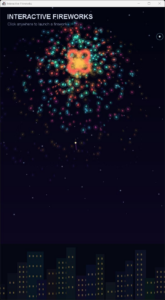
Interactive Fireworks
Source code
Save the following code as InteractiveFireworks.java:
import javax.swing.*;
import java.awt.*;
import java.awt.event.*;
import java.awt.geom.*;
import java.util.*;

public class InteractiveFireworks extends JPanel {
    private static final int W = 540, H = 960;
    private final Random random = new Random();
    private final java.util.List<Rocket> rockets = new ArrayList<>();
    private final java.util.List<Particle> particles = new ArrayList<>();
    private final Timer timer = new Timer(16, e -> update());
    private long lastLaunch;

    public InteractiveFireworks() {
        setPreferredSize(new Dimension(W, H));
        setBackground(new Color(3, 5, 20));

        addMouseListener(new MouseAdapter() {
            @Override
            public void mousePressed(MouseEvent e) {
                double x = e.getX() * W / (double) getWidth();
                double y = e.getY() * H / (double) getHeight();
                launch(x, y);
            }
        });
    }

    @Override
    public void addNotify() {
        super.addNotify();
        lastLaunch = System.currentTimeMillis();
        timer.start();
    }

    @Override
    public void removeNotify() {
        timer.stop();
        super.removeNotify();
    }

    private void launch(double tx, double ty) {
        double x = 40 + random.nextDouble() * (W - 80);
        double y = H;
        double dx = tx - x;
        double dy = ty - y;
        double distance = Math.max(1, Math.hypot(dx, dy));
        double speed = 9 + random.nextDouble() * 3;

        rockets.add(new Rocket(x, y,
                dx / distance * speed,
                dy / distance * speed,
                tx, ty, random.nextFloat()));
    }

    private void update() {
        long now = System.currentTimeMillis();

        if (now - lastLaunch >= 1700) {
            launch(80 + random.nextDouble() * (W - 160),
                    100 + random.nextDouble() * 350);
            lastLaunch = now;
        }

        for (Iterator<Rocket> it = rockets.iterator(); it.hasNext();) {
            Rocket r = it.next();
            double remaining = Point2D.distance(
                    r.x, r.y, r.tx, r.ty);

            if (remaining <= Math.hypot(r.vx, r.vy)) {
                r.x = r.tx;
                r.y = r.ty;
                explode(r);
                it.remove();
            } else {
                r.x += r.vx;
                r.y += r.vy;
            }
        }

        for (Iterator<Particle> it = particles.iterator();
             it.hasNext();) {
            Particle p = it.next();

            p.px = p.x;
            p.py = p.y;
            p.x += p.vx;
            p.y += p.vy;
            p.vx *= .988;
            p.vy = p.vy * .988 + .075;
            p.life -= .013f;

            if (p.life <= 0) it.remove();
        }

        repaint();
    }

    private void explode(Rocket r) {
        int count = 80 + random.nextInt(30);
        int pattern = random.nextInt(3);

        for (int i = 0; i < count; i++) {
            double angle = pattern == 2
                    ? random.nextDouble() * Math.PI * 2
                    : i * Math.PI * 2 / count;

            double speed = 2 + random.nextDouble() * 4;

            if (pattern == 1) {
                speed *= .5 + Math.abs(Math.sin(angle * 2));
            }

            particles.add(new Particle(r.x, r.y,
                    Math.cos(angle) * speed,
                    Math.sin(angle) * speed,
                    r.hue + random.nextFloat() * .08f));
        }
    }

    @Override
    protected void paintComponent(Graphics graphics) {
        super.paintComponent(graphics);
        Graphics2D g = (Graphics2D) graphics.create();
        g.setRenderingHint(RenderingHints.KEY_ANTIALIASING,
                RenderingHints.VALUE_ANTIALIAS_ON);
        g.scale(getWidth() / (double) W,
                getHeight() / (double) H);

        g.setPaint(new GradientPaint(0, 0,
                new Color(3, 5, 20),
                0, H, new Color(20, 9, 44)));
        g.fillRect(0, 0, W, H);

        drawCity(g);

        for (Rocket r : rockets) {
            g.setColor(Color.WHITE);
            g.fill(new Ellipse2D.Double(r.x - 3, r.y - 3, 6, 6));
            g.setColor(new Color(255, 190, 100, 100));
            g.setStroke(new BasicStroke(3));
            g.draw(new Line2D.Double(
                    r.x, r.y + 18, r.x, r.y));
        }

        for (Particle p : particles) {
            Color c = Color.getHSBColor(p.hue % 1f, .8f, 1f);
            int alpha = (int) (p.life * 230);

            g.setColor(new Color(c.getRed(),
                    c.getGreen(), c.getBlue(), alpha / 4));
            g.fill(new Ellipse2D.Double(
                    p.x - 8, p.y - 8, 16, 16));

            g.setColor(new Color(c.getRed(),
                    c.getGreen(), c.getBlue(), alpha));
            g.setStroke(new BasicStroke(2,
                    BasicStroke.CAP_ROUND,
                    BasicStroke.JOIN_ROUND));
            g.draw(new Line2D.Double(p.px, p.py, p.x, p.y));
            g.fill(new Ellipse2D.Double(
                    p.x - 2, p.y - 2, 4, 4));
        }

        g.dispose();
    }

    private void drawCity(Graphics2D g) {
        for (int i = 0; i < 18; i++) {
            int x = i * 32;
            int height = 45 + (i * 37) % 110;

            g.setColor(new Color(8, 12, 28));
            g.fillRect(x, H - height, 35, height);

            g.setColor(new Color(255, 205, 90, 100));
            for (int y = H - height + 12; y < H - 8; y += 18) {
                g.fillRect(x + 8, y, 4, 6);
                g.fillRect(x + 22, y, 4, 6);
            }
        }
    }

    private static class Rocket {
        double x, y, vx, vy, tx, ty;
        float hue;

        Rocket(double x, double y, double vx, double vy,
               double tx, double ty, float hue) {
            this.x = x;
            this.y = y;
            this.vx = vx;
            this.vy = vy;
            this.tx = tx;
            this.ty = ty;
            this.hue = hue;
        }
    }

    private static class Particle {
        double x, y, px, py, vx, vy;
        float hue, life = 1f;

        Particle(double x, double y,
                 double vx, double vy, float hue) {
            this.x = this.px = x;
            this.y = this.py = y;
            this.vx = vx;
            this.vy = vy;
            this.hue = hue;
        }
    }

    public static void main(String[] args) {
        SwingUtilities.invokeLater(() -> {
            JFrame frame = new JFrame("SwingLoops - Fireworks");
            frame.setDefaultCloseOperation(JFrame.EXIT_ON_CLOSE);
            frame.setContentPane(new InteractiveFireworks());
            frame.pack();
            frame.setLocationRelativeTo(null);
            frame.setVisible(true);
        });
    }
}
Run the example
You need Java 17 or later and a desktop environment capable of running Swing applications.
Open a terminal in the directory containing InteractiveFireworks.java, then compile and run it:
javac InteractiveFireworks.java
java InteractiveFireworks
A window with a preferred drawing area of 540 × 960 pixels opens. Fireworks launch automatically every 1.7 seconds.
Click anywhere in the window to launch a rocket toward that position. Clicking several locations creates multiple simultaneous explosions.
You can change the preferred panel size if the window is too large for your screen.
How does the animation work?
Updating the animation with a Swing Timer
The application uses a javax.swing.Timer to update the animation approximately every 16 milliseconds:
private final Timer timer = new Timer(16, e -> update());
Each update moves the rockets, updates the particles, removes expired objects, and requests a repaint.
The timer starts in addNotify() and stops in removeNotify(), preventing the animation from continuing after the panel is removed.
Because the timer executes its callback on Swing’s Event Dispatch Thread, mouse events, animation updates, and painting share the same thread.
Moving rockets toward the target
Each rocket starts near the bottom of the screen and receives a velocity pointing toward its target.
The direction is calculated from the difference between the target and starting positions:
double dx = tx - x;
double dy = ty - y;
double distance = Math.max(1, Math.hypot(dx, dy));
Math.hypot() calculates the Euclidean distance between two points.
We divide the direction components by this distance and multiply them by the desired speed:
double vx = dx / distance * speed;
double vy = dy / distance * speed;
This ensures that the rocket moves at a consistent speed regardless of its destination.
During each animation update, its position changes according to its velocity:
r.x += r.vx;
r.y += r.vy;
Once the rocket is close enough to reach its target during the next movement, the program triggers an explosion.
Creating particles with circular motion
An explosion produces between 80 and 109 particles.
For a circular burst, each particle receives a different angle:
double angle = i * Math.PI * 2 / count;
The horizontal and vertical velocity components are calculated using:
double vx = Math.cos(angle) * speed;
double vy = Math.sin(angle) * speed;
Together, these calculations distribute particles around the explosion center.
The example also introduces variations in particle speed and direction, producing different explosion shapes.
Adding gravity and damping
After an explosion, particles move independently.
Each frame applies damping and gravity:
p.vx *= .988;
p.vy = p.vy * .988 + .075;
Multiplying velocity by .988 gradually slows the particles.
The additional .075 accelerates them downward because Java2D’s Y coordinate increases toward the bottom of the screen.
The result is a curved trajectory: particles spread outward, slow down, and eventually fall.
This is a simple visual physics simulation rather than a fully realistic model, but it works well for a fireworks animation.
Creating fading particles
Each particle begins with a lifetime of 1.0:
float life = 1f;
Its lifetime decreases with every update:
p.life -= .013f;
The remaining lifetime determines the particle’s transparency:
int alpha = (int) (p.life * 230);
As life approaches zero, the particle becomes less visible.
Expired particles are removed using the iterator, which also prevents the particle collection from growing indefinitely.
Creating a glow effect
The glow is produced by drawing each particle twice.
First, a larger circle is drawn with low opacity:
g.setColor(new Color(
        c.getRed(), c.getGreen(), c.getBlue(), alpha / 4));

g.fill(new Ellipse2D.Double(
        p.x - 8, p.y - 8, 16, 16));
A small, brighter particle is then drawn on top.
The application also draws a short line between each particle’s previous and current positions, creating a glowing motion trail.
This approximates a neon effect using ordinary Java2D shapes, without shaders or blur filters.
Generating firework colors
The example uses Color.getHSBColor() to generate colors:
Color c = Color.getHSBColor(p.hue % 1f, .8f, 1f);
Each rocket receives a random hue, and its particles use nearby hue values.
This gives every explosion a recognizable color theme while still allowing subtle variation between individual particles.
Drawing the night sky
The background uses a GradientPaint that transitions from dark navy to deep purple.
A simple city skyline is drawn using rectangles, with smaller yellow rectangles representing illuminated windows.
These elements provide context for the fireworks without requiring image assets.
Customize the animation
Try changing one parameter at a time to see how it affects the result.
| Parameter | Effect |
|---|---|
16 in the timer |
Animation update interval in milliseconds |
1700 |
Time between automatic launches |
80 + random.nextInt(30) |
Number of particles per explosion |
9 + random.nextDouble() * 3 |
Rocket speed |
.988 |
Particle damping; smaller values slow particles faster |
.075 |
Gravity; larger values make particles fall faster |
.013f |
Lifetime reduction; larger values make particles disappear sooner |
new Color(3, 5, 20) |
Background color |
For example, increasing the particle count to 150 makes each firework look fuller, but also increases the amount of rendering work.
Reducing gravity creates a floating, almost magical explosion, while increasing gravity makes particles fall more quickly.
Experimenting with these values is an easy way to create your own animation style.
The complete example uses only Java Swing and Java2D. No external libraries, physics engines, or image assets are required.
Happy coding!