Use addActionListener() to run code when a JButton is activated. In this example, clicking a button changes the text of a label in the same window.
Source code
Save the following code as ButtonClickExample.java:
import java.awt.BorderLayout;
import javax.swing.BorderFactory;
import javax.swing.JButton;
import javax.swing.JFrame;
import javax.swing.JLabel;
import javax.swing.JPanel;
import javax.swing.SwingConstants;
import javax.swing.SwingUtilities;

public class ButtonClickExample {
    void main() {
        SwingUtilities.invokeLater(this::showWindow);
    }

    private void showWindow() {
        JLabel message = new JLabel(
                "Click the button.", SwingConstants.CENTER);
        JButton button = new JButton("Click me");

        button.addActionListener(event ->
                message.setText("Button clicked!"));

        JPanel panel = new JPanel(new BorderLayout(0, 12));
        panel.setBorder(BorderFactory.createEmptyBorder(20, 30, 20, 30));
        panel.add(message, BorderLayout.CENTER);

        JPanel buttonPanel = new JPanel();
        buttonPanel.add(button);
        panel.add(buttonPanel, BorderLayout.PAGE_END);

        JFrame frame = new JFrame("Button Click");
        frame.setDefaultCloseOperation(JFrame.EXIT_ON_CLOSE);
        frame.setContentPane(panel);
        frame.pack();
        frame.setLocationRelativeTo(null);
        frame.setVisible(true);
    }
}
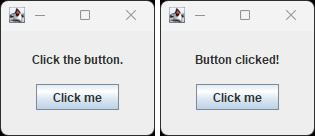
What the window looks like
Explanation
The JLabel starts with the text Click the button.. The JButton displays Click me. This line connects the button to the label:
button.addActionListener(event ->
        message.setText("Button clicked!"));
addActionListener() registers a listener that Swing calls when the button is activated. The lambda is the listener in this example. Its event parameter receives information about the action, but the example only needs to update the label, so it does not use that parameter.
When the listener runs, message.setText() changes the existing label. It works whether you click the button with a mouse or activate it with the keyboard.
SwingUtilities.invokeLater() creates the window on the event dispatch thread. Swing also runs the listener on that thread, so it can update the label directly. Keep listeners short so the window stays responsive.
Run the example
javac ButtonClickExample.java
java ButtonClickExample
The window opens with the message Click the button.. Click Click me and the label changes to Button clicked!.