Use JFrame to create a Swing window with a title bar and an area for components. In this example, you will open a window with a centered welcome message.
Source code
Save the following code as JFrameExample.java:
import javax.swing.JFrame;
import javax.swing.JLabel;
import javax.swing.SwingConstants;
import javax.swing.SwingUtilities;

public class JFrameExample {
    void main() {
        SwingUtilities.invokeLater(this::showWindow);
    }

    private void showWindow() {
        JFrame frame = new JFrame("Hello, Swing!");
        frame.setDefaultCloseOperation(JFrame.EXIT_ON_CLOSE);

        JLabel message = new JLabel(
                "Welcome to Swing", SwingConstants.CENTER);
        frame.add(message);

        frame.setSize(400, 240);
        frame.setLocationRelativeTo(null);
        frame.setVisible(true);
    }
}
What the window looks like
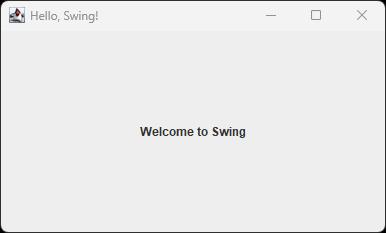
This illustration shows the layout. The title bar and window controls may look different on your operating system.
Explanation
new JFrame("Hello, Swing!") creates the window and sets its title. EXIT_ON_CLOSE tells Java to exit the application when you close this window.
The JLabel displays Welcome to Swing. SwingConstants.CENTER centers the text horizontally, and frame.add(message) places the label inside the window.
setSize(400, 240) sets the size of the entire window, including its border and title bar. Call setLocationRelativeTo(null) after setting the size to center the window on the screen. Finally, setVisible(true) displays it.
The main() method uses SwingUtilities.invokeLater(this::showWindow) to schedule window creation on Swing’s event dispatch thread. This is the thread Swing uses to handle events and update the interface.
Run the example
Compile and run the file:
javac JFrameExample.java
java JFrameExample
A window titled Hello, Swing! opens with the welcome message in the center. Close the window to end the program.