
You can turn text into a particle animation by drawing each word into a transparent image and treating its visible pixels as destinations. In this example, 840 glowing dots form JAVA, change into SwingLoops, and return to the original cloud. Everything is drawn with Java Swing and Java 2D.
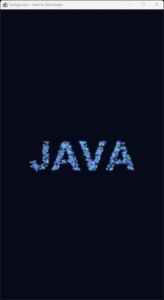
Particle Text Morph
Source code
Save the following code as ParticleTextMorph.java:
import java.awt.*;
import java.awt.geom.Ellipse2D;
import java.awt.image.BufferedImage;
import java.util.ArrayList;
import java.util.Collections;
import java.util.List;
import java.util.Random;
import javax.swing.*;

public class ParticleTextMorph extends JPanel {
    private static final int WIDTH = 540, HEIGHT = 960, COUNT = 840;
    private static final double CYCLE = 12.0;

    private final Point[] cloud = new Point[COUNT];
    private final Point[] javaText = textPoints("JAVA", 132, 7);
    private final Point[] logoText = textPoints("SwingLoops", 90, 19);
    private final Color[] colors = new Color[COUNT];
    private final Timer timer = new Timer(16, _ -> repaint());
    private long start;

    public ParticleTextMorph() {
        setPreferredSize(new Dimension(WIDTH, HEIGHT));
        setBackground(new Color(7, 10, 24));
        Random random = new Random(42);
        for (int i = 0; i < COUNT; i++) {
            cloud[i] = new Point(
                    40 + random.nextInt(WIDTH - 80),
                    190 + random.nextInt(HEIGHT - 380));
            float hue = 0.47f + 0.25f * random.nextFloat();
            colors[i] = Color.getHSBColor(hue, 0.55f, 1.0f);
        }
    }

    private static Point[] textPoints(String text, int size, long seed) {
        BufferedImage mask = new BufferedImage(
                WIDTH, HEIGHT, BufferedImage.TYPE_INT_ARGB);
        Graphics2D g = mask.createGraphics();
        try {
            g.setRenderingHint(RenderingHints.KEY_TEXT_ANTIALIASING,
                    RenderingHints.VALUE_TEXT_ANTIALIAS_ON);
            Font font = new Font(Font.SANS_SERIF, Font.BOLD, size);
            while (font.getSize() > 1
                    && g.getFontMetrics(font).stringWidth(text) > WIDTH - 80) {
                font = font.deriveFont(font.getSize2D() - 1);
            }
            g.setFont(font);
            FontMetrics metrics = g.getFontMetrics();
            int x = (WIDTH - metrics.stringWidth(text)) / 2;
            int y = (HEIGHT + metrics.getAscent() - metrics.getDescent()) / 2;
            g.setColor(Color.WHITE);
            g.drawString(text, x, y);
        } finally {
            g.dispose();
        }

        List<Point> pixels = new ArrayList<>();
        for (int y = 0; y < HEIGHT; y += 2) {
            for (int x = 0; x < WIDTH; x += 2) {
                if ((mask.getRGB(x, y) >>> 24) > 180) {
                    pixels.add(new Point(x, y));
                }
            }
        }
        if (pixels.isEmpty()) {
            throw new IllegalArgumentException("No visible pixels for: " + text);
        }
        Collections.shuffle(pixels, new Random(seed));
        Point[] points = new Point[COUNT];
        for (int i = 0; i < COUNT; i++) {
            points[i] = pixels.get(i % pixels.size());
        }
        return points;
    }

    @Override
    public void addNotify() {
        super.addNotify();
        start = System.nanoTime();
        timer.start();
    }

    @Override
    public void removeNotify() {
        timer.stop();
        super.removeNotify();
    }

    private static double smooth(double u) {
        return u * u * (3 - 2 * u);
    }

    @Override
    protected void paintComponent(Graphics graphics) {
        super.paintComponent(graphics);
        Graphics2D g = (Graphics2D) graphics.create();
        try {
            g.setRenderingHint(RenderingHints.KEY_ANTIALIASING,
                    RenderingHints.VALUE_ANTIALIAS_ON);

            double scale = Math.min(
                    getWidth() / (double) WIDTH, getHeight() / (double) HEIGHT);
            g.translate((getWidth() - WIDTH * scale) / 2,
                    (getHeight() - HEIGHT * scale) / 2);
            g.scale(scale, scale);

            double t = ((System.nanoTime() - start) / 1e9) % CYCLE;
            Point[] from;
            Point[] to;
            double u;

            if (t < 3) {
                from = cloud; to = javaText; u = t / 3;
            } else if (t < 5) {
                from = javaText; to = javaText; u = 0;
            } else if (t < 8) {
                from = javaText; to = logoText; u = (t - 5) / 3;
            } else if (t < 9) {
                from = logoText; to = logoText; u = 0;
            } else {
                from = logoText; to = cloud; u = (t - 9) / 3;
            }

            double blend = smooth(u);
            double arc = 46 * Math.sin(Math.PI * blend);
            Ellipse2D.Double dot = new Ellipse2D.Double();

            for (int i = 0; i < COUNT; i++) {
                double x = from[i].x + (to[i].x - from[i].x) * blend;
                double y = from[i].y + (to[i].y - from[i].y) * blend;
                x += arc * Math.cos(i * 2.39996);
                y += arc * Math.sin(i * 2.39996);

                g.setColor(colors[i]);
                g.setComposite(AlphaComposite.SrcOver.derive(0.12f));
                dot.setFrame(x - 5, y - 5, 10, 10);
                g.fill(dot);

                g.setComposite(AlphaComposite.SrcOver);
                dot.setFrame(x - 1.6, y - 1.6, 3.2, 3.2);
                g.fill(dot);
            }
        } finally {
            g.dispose();
        }
    }

    static void main() {
        SwingUtilities.invokeLater(() -> {
            JFrame frame = new JFrame("SwingLoops - Particle Text Morph");
            frame.setDefaultCloseOperation(JFrame.EXIT_ON_CLOSE);
            frame.setContentPane(new ParticleTextMorph());
            frame.pack();
            frame.setLocationRelativeTo(null);
            frame.setVisible(true);
        });
    }
}
Run the example
Open a terminal in the directory containing the file and run:
javac ParticleTextMorph.java
java ParticleTextMorph
The application opens a portrait window with a preferred drawing area of 540 × 960. If it is too tall for your screen, change the preferred size to 405 × 720. The drawing scales to the window while preserving its proportions. Close the window to stop the animation.
Turning letters into particle destinations
The textPoints() method calls drawString() on a transparent BufferedImage. Swing never displays this image directly. Its purpose is to tell the program where the letters are.
The program visits every second pixel on both axes. A pixel is eligible when its alpha channel, a value from 0 (transparent) to 255 (opaque), exceeds 180:
if ((mask.getRGB(x, y) >>> 24) > 180) {
    pixels.add(new Point(x, y));
}
The unsigned shift extracts alpha from the packed ARGB value. The threshold mostly keeps the solid part of each letter and discards faint pixels along antialiased edges.
The program shuffles the eligible coordinates with a fixed seed so it can pick points across the word instead of filling it from top to bottom. If fewer coordinates are available than particles, modulo indexing reuses some coordinates. This work happens once for each word when the panel is created.
Moving a particle between two points
Each particle has three destinations: a point in the cloud, a point in JAVA, and a point in SwingLoops. All three arrays use the same particle index. During a transition, the program interpolates between the current and next destinations:
double x = from[i].x + (to[i].x - from[i].x) * blend;
double y = from[i].y + (to[i].y - from[i].y) * blend;
A blend of 0 gives the starting position. A blend of 0.5 gives the midpoint, and a blend of 1 gives the destination. Instead of using elapsed progress directly, the code passes it through a smoothstep function:
return u * u * (3 - 2 * u);
The curve starts and ends with a slope of zero. That gives the particles time to accelerate away from a word and slow down as they settle into the next one.
The sine term adds a temporary offset to the straight path. It is zero at both endpoints and largest halfway through. The offset direction depends on the particle index, so the dots bend in different directions without missing their destinations.
Drawing the glow and repeating the motion
Each particle is drawn twice: a wide translucent circle creates a halo and a smaller opaque circle forms the bright center. Both use the same color. The panel clears the background on every repaint, so this glow does not depend on retaining previous frames.
A Swing timer requests a repaint approximately every 16 milliseconds. The code calculates positions from elapsed time rather than counting frames. During the first three seconds the particles gather into JAVA; they hold for two seconds, morph for three, hold for one, then spend three seconds returning to the original cloud. The last destination is also the next cycle’s starting position, so no particle needs to jump when the clock wraps.
The window is created on Swing’s event-dispatch thread. The timer starts when the panel becomes displayable and stops when it is removed.
Customize the animation
Try replacing JAVA with your initials. The example reduces the font size to fit the available width, but short words generally leave more room for distinct particles. To compare straight and curved paths, set the arc multiplier from 46 to 0 and run the example again.
The full source code above is free to copy and run. Find more examples in the SwingLoops repository.