
There’s something delightful about tiny, self‑contained graphics demos. No frameworks, no build systems, no node_modules folder the size of a small moon — just one .java file, javac, and a window that does something you didn’t expect from Swing.
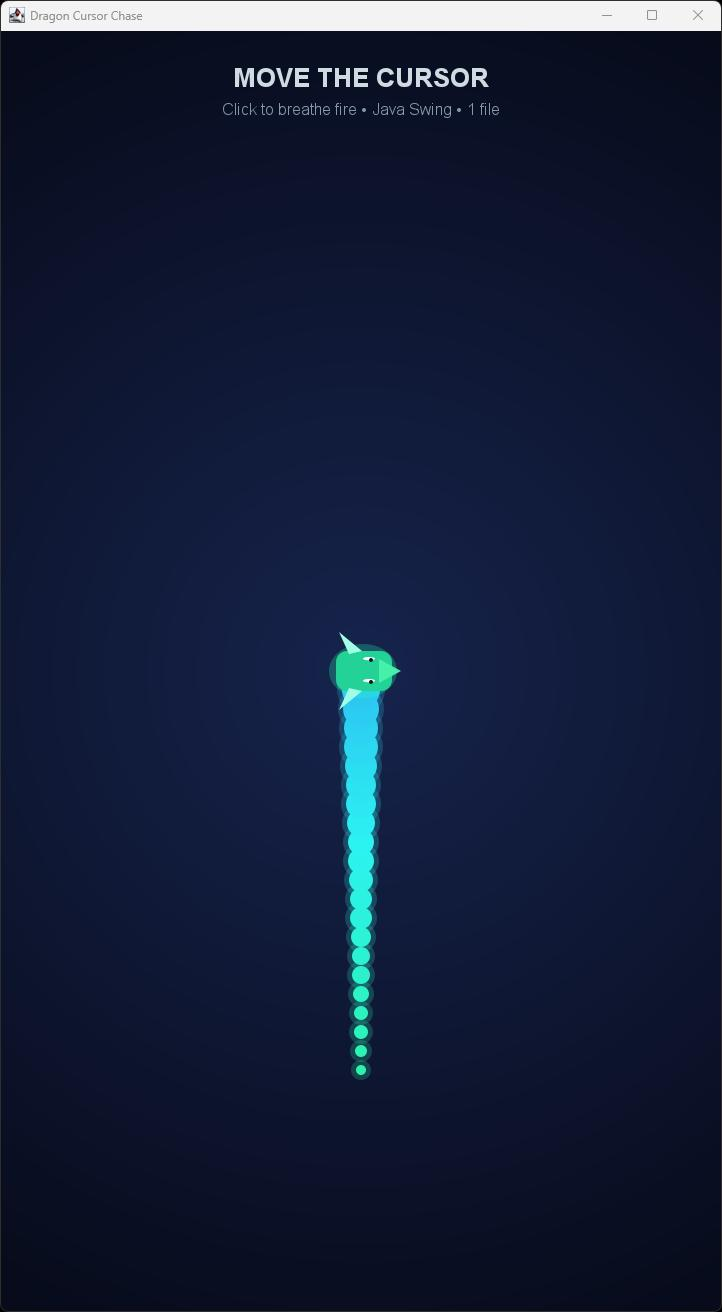
Dragon Cursor Chase
DragonCursorChaseMinimal is exactly that: a neon dragon made of 22 glowing circles that slithers after your cursor, blinks lazily at you, and breathes fire when you click. It fits in about 150 lines. Let’s take a tour of how it works and why the tricks inside it are worth stealing for your own doodles.
The idea in one paragraph
The dragon is a chain of points. The head chases the mouse with a simple spring‑like ease. Every other body segment just follows the one in front of it at a fixed distance. Render each point as a glowing circle, rotate a stylized head on top of the first point, and sprinkle particles when the user clicks. That’s the whole trick.
The body: a follow‑the‑leader chain
The state of the dragon is two parallel arrays of coordinates:
static final int N = 22;
final double[] x = new double[N], y = new double[N];
The head (index 0) does the actual chasing — a classic exponential smoothing toward the target:
x[0] += (mouseX - x[0]) * .28;
y[0] += (mouseY - y[0]) * .28;
That .28 is the “springiness”. Lower values make a lazier, more elegant dragon; higher values make a caffeinated one.
The rest of the body is where the magic happens. Each segment is pulled toward the previous one, but clamped to a fixed distance of 19 pixels:
for (int i = 1; i < N; i++) {
    double dx = x[i] - x[i - 1], dy = y[i] - y[i - 1];
    double d = Math.max(.001, Math.hypot(dx, dy));
    x[i] = x[i - 1] + dx / d * 19;
    y[i] = y[i - 1] + dy / d * 19;
}
This is sometimes called a distance constraint or a one‑pass rope solver. It gives you smooth, snake‑like body motion for basically free. The Math.max(.001, …) guard is a tiny but important detail — it prevents a division by zero when two segments occupy the same point (which happens on the very first frame).
Getting the head to point the right way
Because we saved the head’s previous position, we can compute its heading with a single atan2:
angle = Math.atan2(y[0] - oldY, x[0] - oldX);
That angle is then used both to rotate the head graphics and to aim the fire breath. It’s a nice example of how one derived value can unify several visual effects.
Painting the body: glow for the price of one extra oval
Each segment is drawn twice — once large and translucent for the halo, once smaller and opaque for the core:
g.setColor(new Color(c.getRed(), c.getGreen(), c.getBlue(), 55));
g.fillOval((int) x[i] - r - 5, (int) y[i] - r - 5, (r + 5) * 2, (r + 5) * 2);
g.setColor(c);
g.fillOval((int) x[i] - r, (int) y[i] - r, r * 2, r * 2);
That’s a poor‑man’s bloom effect. No shaders, no compositing tricks, just two ovals per segment. The radius shrinks along the body (5 + 15 * t) so the tail tapers naturally, and the hue drifts slightly with Color.getHSBColor(.44 + .10 * t, …) for a subtle gradient from teal to sea‑green.
The loop iterates backwards (for (int i = N - 1; i > 0; i--)), so bigger segments closer to the head end up painted on top of smaller tail segments. Painter’s algorithm at its most literal.
The head: a rotated coordinate system
Rather than doing trigonometry to place each eye, ear, and nostril, the code creates a child Graphics2D, translates it to the head position, and rotates it:
Graphics2D h = (Graphics2D) g.create();
h.translate(x[0], y[0]);
h.rotate(angle);
Now every subsequent drawing call — the snout Path2D, the triangular ears, the eyes — can be written in the dragon’s own local space, with x pointing forward. Notice how the two ears are just mirrored polygons:
h.fillPolygon(new int[]{-12, -22, 1}, new int[]{-17, -39, -20}, 3);
h.fillPolygon(new int[]{-12, -22, 1}, new int[]{ 17,  39,  20}, 3);
The two eyes get a cheap blinking animation by squishing their vertical radius with a sine wave:
double eyeH = 6 * Math.max(.12, Math.abs(Math.sin(time * .22)));
The Math.max(.12, …) keeps the eyes from ever fully closing, so the dragon looks alert rather than sleepy. And crucially, h.dispose() is called when we’re done — always dispose the graphics contexts you create(), or you’ll leak state into the parent.
Fire breath: particles with a lifetime
Clicking sets a timestamp:
public void mousePressed(MouseEvent e) {
    fireUntil = System.currentTimeMillis() + 550;
}
For 550 milliseconds after the click, each frame spawns four Flame particles, each with:
- a position offset forward from the head by 38 pixels along
angle, - a velocity fanned out by up to ±0.275 radians from the heading,
- a random lifetime between 28 and 46 frames.
The particle physics is trivial but tuned:
void update() {
    x += vx;
    y += vy;
    vx *= .965;
    vy = vy * .965 + .025;
    life--;
}
Horizontal velocity decays; vertical velocity decays and gets a gentle downward tug. Result: flames shoot forward, slow down, and drift down like hot embers.
Rendering each flame is a single circle whose size, color, and alpha are all functions of remaining life:
float age = f.life / (float) f.maxLife;
int r = Math.max(2, (int) (18 * age));
Color c = Color.getHSBColor(.02f + .12f * age, 1, 1);
Young flames are bigger, more yellow, and more opaque. Old flames shrink into small, dim red pixels before vanishing. That single hue interpolation from .02 (red) to .14 (orange‑yellow) is doing a lot of aesthetic heavy lifting.
The background: one gradient to rule them all
The dark deep‑blue backdrop is drawn once per frame as a radial gradient:
g.setPaint(new RadialGradientPaint(
        new Point2D.Double(getWidth() / 2.0, getHeight() / 2.0),
        Math.max(getWidth(), getHeight()) * .7f,
        new float[]{0, 1},
        new Color[]{new Color(22, 35, 76), new Color(3, 5, 14)}));
g.fillRect(0, 0, getWidth(), getHeight());
It’s the cheapest way to make the scene feel like it has depth. The neon colors of the dragon pop against it precisely because the corners fade almost to black.
The animation loop: javax.swing.Timer at 60 fps
There’s no thread management, no game loop, no Thread.sleep in a run() method. Just:
new Timer(16, e -> update()).start();
A javax.swing.Timer fires its callback on the Event Dispatch Thread every 16 ms — roughly 60 fps. Inside update() we move the dragon, tick the particles, then call repaint(). Because everything runs on the EDT, there are no synchronization concerns between input (mouse events) and rendering. For a demo of this size, it’s the right tool.
Why this pattern is worth stealing
A few takeaways that generalize beyond dragons:
- Chains of points + a distance constraint are a shockingly good approximation of ropes, snakes, tentacles, and hair. One loop, no physics library.
- Translate + rotate a child
Graphics2Dwhenever you’re drawing a directional object. Trying to bake rotation into every coordinate by hand is a recipe for off‑by‑one‑radian bugs. - Two‑pass “halo + core” drawing gives you a convincing glow without touching any compositing APIs or
BufferedImages. - Particles = position + velocity + life. That’s genuinely all you need for 90% of “juice” effects.
javax.swing.Timeris fine. For interactive art at 60 fps, the EDT will not let you down.
Running it
Save the file as DragonCursorChaseMinimal.java and, from the same folder:
javac DragonCursorChaseMinimal.java
java DragonCursorChaseMinimal
A 720×1280 window opens. Move your mouse. The dragon follows. Click and hold — it breathes fire in whichever direction it’s currently pointed. Let go and the flames drift, cool, and disappear.
That’s it. One file, one dragon, zero dependencies. Sometimes the best way to remember why you liked programming is to make something that has no business existing and put it on your screen for an afternoon.
The Complete Code
import javax.swing.*;
import java.awt.*;
import java.awt.event.MouseAdapter;
import java.awt.event.MouseEvent;
import java.awt.geom.Ellipse2D;
import java.awt.geom.Path2D;
import java.awt.geom.Point2D;
import java.util.ArrayList;
import java.util.Iterator;
import java.util.List;
import java.util.Random;

public class DragonCursorChaseMinimal extends JPanel {
    static final int N = 22;
    final double[] x = new double[N], y = new double[N];
    final List<Flame> fire = new ArrayList<>();
    final Random random = new Random();
    double mouseX = 360, mouseY = 640, angle, time;
    long fireUntil;

    DragonCursorChaseMinimal() {
        setPreferredSize(new Dimension(720, 1280));
        setBackground(new Color(4, 7, 20));
        for (int i = 0; i < N; i++) {
            x[i] = mouseX;
            y[i] = mouseY + i * 19;
        }

        MouseAdapter mouse = new MouseAdapter() {
            public void mouseMoved(MouseEvent e) {
                aim(e);
            }

            public void mouseDragged(MouseEvent e) {
                aim(e);
            }

            public void mousePressed(MouseEvent e) {
                fireUntil = System.currentTimeMillis() + 550;
            }

            void aim(MouseEvent e) {
                mouseX = e.getX();
                mouseY = e.getY();
            }
        };
        addMouseMotionListener(mouse);
        addMouseListener(mouse);
        new Timer(16, e -> update()).start();
    }

    public static void main(String[] args) {
        SwingUtilities.invokeLater(() -> {
            JFrame frame = new JFrame("Dragon Cursor Chase");
            frame.setDefaultCloseOperation(JFrame.EXIT_ON_CLOSE);
            frame.setContentPane(new DragonCursorChaseMinimal());
            frame.pack();
            frame.setLocationRelativeTo(null);
            frame.setVisible(true);
        });
    }

    void update() {
        double oldX = x[0], oldY = y[0];
        x[0] += (mouseX - x[0]) * .28;
        y[0] += (mouseY - y[0]) * .28;
        angle = Math.atan2(y[0] - oldY, x[0] - oldX);

        for (int i = 1; i < N; i++) {
            double dx = x[i] - x[i - 1], dy = y[i] - y[i - 1];
            double d = Math.max(.001, Math.hypot(dx, dy));
            x[i] = x[i - 1] + dx / d * 19;
            y[i] = y[i - 1] + dy / d * 19;
        }

        if (System.currentTimeMillis() < fireUntil) emitFire();
        for (Iterator<Flame> it = fire.iterator(); it.hasNext(); ) {
            Flame f = it.next();
            f.update();
            if (f.life <= 0) it.remove();
        }
        time += .05;
        repaint();
    }

    void emitFire() {
        for (int i = 0; i < 4; i++) {
            double a = angle + (random.nextDouble() - .5) * .55;
            double speed = 7 + random.nextDouble() * 6;
            fire.add(new Flame(x[0] + Math.cos(angle) * 38,
                    y[0] + Math.sin(angle) * 38,
                    Math.cos(a) * speed, Math.sin(a) * speed,
                    28 + random.nextInt(18)));
        }
    }

    protected void paintComponent(Graphics raw) {
        super.paintComponent(raw);
        Graphics2D g = (Graphics2D) raw.create();
        g.setRenderingHint(RenderingHints.KEY_ANTIALIASING, RenderingHints.VALUE_ANTIALIAS_ON);

        g.setPaint(new RadialGradientPaint(
                new Point2D.Double(getWidth() / 2.0, getHeight() / 2.0),
                Math.max(getWidth(), getHeight()) * .7f,
                new float[]{0, 1},
                new Color[]{new Color(22, 35, 76), new Color(3, 5, 14)}));
        g.fillRect(0, 0, getWidth(), getHeight());

        for (int i = N - 1; i > 0; i--) {
            double t = 1 - i / (double) N;
            int r = (int) (5 + 15 * t);
            Color c = Color.getHSBColor((float) (.44 + .10 * t), .82f, .95f);
            g.setColor(new Color(c.getRed(), c.getGreen(), c.getBlue(), 55));
            g.fillOval((int) x[i] - r - 5, (int) y[i] - r - 5, (r + 5) * 2, (r + 5) * 2);
            g.setColor(c);
            g.fillOval((int) x[i] - r, (int) y[i] - r, r * 2, r * 2);
        }

        Graphics2D h = (Graphics2D) g.create();
        h.translate(x[0], y[0]);
        h.rotate(angle);
        h.setColor(new Color(40, 255, 190, 65));
        h.fillOval(-32, -27, 68, 54);
        h.setColor(new Color(35, 210, 150));
        h.fillRoundRect(-25, -20, 56, 40, 22, 22);

        Path2D snout = new Path2D.Double();
        snout.moveTo(18, -12);
        snout.lineTo(40, 0);
        snout.lineTo(18, 12);
        snout.closePath();
        h.setColor(new Color(70, 240, 170));
        h.fill(snout);

        h.setColor(new Color(160, 255, 230));
        h.fillPolygon(new int[]{-12, -22, 1}, new int[]{-17, -39, -20}, 3);
        h.fillPolygon(new int[]{-12, -22, 1}, new int[]{17, 39, 20}, 3);

        double eyeH = 6 * Math.max(.12, Math.abs(Math.sin(time * .22)));
        h.setColor(Color.WHITE);
        h.fill(new Ellipse2D.Double(2, -14, 12, eyeH));
        h.fill(new Ellipse2D.Double(2, 8, 12, eyeH));
        h.setColor(new Color(10, 20, 25));
        h.fillOval(8, -13, 4, 4);
        h.fillOval(8, 9, 4, 4);
        h.dispose();

        for (Flame f : fire) {
            float age = f.life / (float) f.maxLife;
            int r = Math.max(2, (int) (18 * age));
            Color c = Color.getHSBColor(.02f + .12f * age, 1, 1);
            g.setColor(new Color(c.getRed(), c.getGreen(), c.getBlue(), (int) (210 * age)));
            g.fillOval((int) f.x - r / 2, (int) f.y - r / 2, r, r);
        }

        g.setFont(new Font(Font.SANS_SERIF, Font.BOLD, Math.max(18, getWidth() / 27)));
        g.setColor(new Color(240, 250, 255, 220));
        centre(g, "MOVE THE CURSOR", 56);
        g.setFont(new Font(Font.SANS_SERIF, Font.PLAIN, Math.max(13, getWidth() / 45)));
        g.setColor(new Color(190, 215, 235, 175));
        centre(g, "Click to breathe fire • Java Swing • 1 file", 84);
        g.dispose();
    }

    void centre(Graphics2D g, String text, int y) {
        g.drawString(text, (getWidth() - g.getFontMetrics().stringWidth(text)) / 2, y);
    }

    static class Flame {
        double x, y, vx, vy;
        int life, maxLife;

        Flame(double x, double y, double vx, double vy, int life) {
            this.x = x;
            this.y = y;
            this.vx = vx;
            this.vy = vy;
            this.life = this.maxLife = life;
        }

        void update() {
            x += vx;
            y += vy;
            vx *= .965;
            vy = vy * .965 + .025;
            life--;
        }
    }
}